Posts

ESRI Geodesign Summit 2022
Image
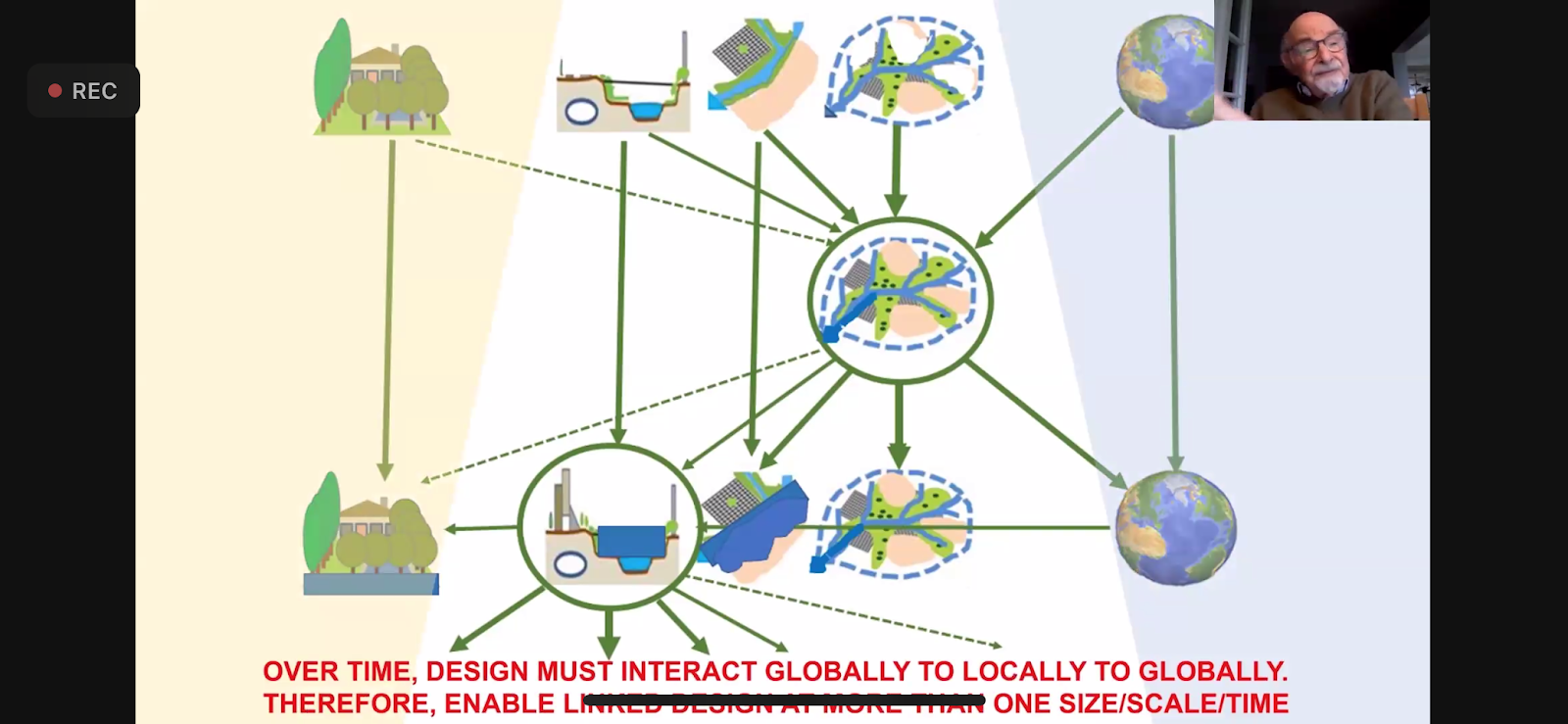
So grateful this event was held this year virtually. I feel that this allows greater participation and opportunities to learn from a wider audience. However, it also allows for interruptions at work, preventing me from watching the entire time. This is where in-person attendance is advantageous. I really enjoyed one speaker that pointed out that GIS doesn't work when siloed. It is best when there is integration across departments and platforms. I have found this to be so very true, and so I constantly encourage interdepartmental and interagency collaboration. He also presented on a project that he did on the Amazon, for over 2 years, and with over 200 scientists. They came up with 89 recommendations. He spoke of how the reduction in water is affecting and diminishing the Amazon. He is a part of a International Geodesign Collaboration group with participation from 61 countries, and over 100 universities, and more that 500 people. They use Hub to organize and host their data.  Anothe...

ESRI UC 2021 Bonus Content

ESRI left the classes online to keep on watching, which I'm super grateful for, because it gives me a chance to go watch classes I missed or that were going at the same time as another class I was attending.  So here is some bonus content. ArcGIS Defense Mapping Standards Base Cartographic Production Using ArcGIS Pro. They started by talking about the move from ArcMap to Pro is a transition, not a migration, and I completely agree. They showed off the apply visual specification to map tool, which was super cool and I want to try. They also talked about the generate product layout tool, which I will need to see to believe. ArcGIS Enterprise: What's New showed off the new homepage editor and new email support. They also showed the append data tool, to hosted feature layers. Runtime conversion tools from ArcMap to Pro in 10.9.1. They showed off the MapViewer beta, with customized pop-ups (it's about time). And in StoryMaps, photo geotags can finally be used to locate map tour ...

ESRI UC 2021 Day 4

 Day 4 started with Water Utility Special Interest Group Meeting. Philip Mielke did a presentation on 3D assets, but didn't answer my question about how he symbolized the 3D ball joints. You can export the 3D BIM model to use online, also Revit files. Emily Champagne did a great presentation as well on how they're using 3D assets. If you want to see how I've used 3D GIS in the past, look here and here . Next was the Wildfire SIG. The Maine Forest Service showed us the InFORM program, which is recognized nationally and works with dashboards. The US Forest Service showed off their Wildland Fire Histomap, and announced that Alert Wildfire will integrate with the Living Atlas. The Closing Livestream told us that 45% of UC participants are outside the U.S. and to know the importance of your work.   ESRI said they had over 60,000 register for the UC this year. I am impressed that they could handle that many people watching live and recorded events. It also amazes me that there ...

ESRI UC 2021 Day 3

 The first class I attended was "ArcGIS StoryMaps: What's New and What's Coming." The presenter started by talking about how to create your own themes. They also showed that new this year: there will be over 1000 fonts (increasing from 80) image editing - for example, making your photos black and white within the StoryMap mapping enhancements highlight maps - super cool! map tour arrows The next class was "UC Central Live: StoryMaps. StoryMaps are story telling through the use of maps. There are over 1.7 million StoryMaps. One-third of these have been authored by students/educators. Which came first, the story or the map? What story are you trying to tell? Who is the primary audience? Who is the secondary audience? Multimedia package. Provide where and why. StoryMaps engage the entire brain - text, pictures, maps, audio, and video. They ended by urging us to tell our stories. The next class was "ArcGIS Online: Tips and Tricks for Viral Maps. The only excitin...

ESRI UC 2021 Day 1

This years theme is " GIS Creating a Sustainable Future ." I am totally bummed this year is yet again virtual, but covid... Jack kicked things off with the Plenary, and hasn't aged a day.  There was a demo in Pro showing aerial imagery blending to reduce shadows, that was super sweet. There is an overlay mode to combine overlapping layers. There is now the ability to change how selections are symbolized, including making them hatched. They have added a command search bar at the top. There is a "change detection wizard" tool that looks super cool. And they finally have an eye dropper tool for colors! They also demo'd data engineering, which looks pretty sweet and helpful. Lots of charts and data digging in this one.  Blending will be available in web map/map viewer. I love that you don't lose topo or color by using this tool. A few new things that are coming: "instant apps" dashboards now support arcade enterprise on kubernetes  cloud based graf...

ESRI UC 2020 Bonus Content

 And you thought I was done...An awesome extra bonus feature of having the UC virtual this year, is that the classes were left online a little longer so we could go back and keep watching and learning more. I love this.   The first extra class I attended was "ArcGIS Enterprise Designing Enterprise Sites." I was really happy to come back across this in the agenda. All speakers focused on "Experience Builder," and no one even mentioned Sites.  I'm glad to learn this is not going away any time soon.  The difference is Experience Builder is for ArcGIS Online, and Enterprise Sites is for Portal. When it comes to planning and design thinking, focus on problem solving.  Site consideration: pick a theme for the homepage. There are 2 places to use images - ROW, image card, and gallery card. Some considerations for mobile - navigation, don't bury the lead, keep it lightweight, have a mobile first viewpoint, and less than 5 embedded content per page. Hidden rows conte...

ESRI UC 2020 Day 3

 Day 3 started with a fun class - ArcGIS Solutions for Defense. Can I just say this session blew my mind?! It was so cool to see the software being used in a different way than I had ever used it before. However, there were some tools highlighted that I can see useful in other projects.  Coordinate conversion (hello CAD) Distance and direction Visibility analysis Military symbology editor is available in Pro only. There is also a defense toolbox you can download that contains a range fan tool, incident analysis tool, and a beach landing tool. They demo'd each of these, and it was so cool. The visibility analysis using DEM and observation points. They also showed a generate grid from point tool, which was so slick and easy. I can see a use for this with creating missing person grids on the spot. They also showed web app builder defense capabilities. These tools do not work in a disconnected environment. The US Army is not using Pro. So, the things to look up and download are Ar...